To the page content
Security Cave Blog: Microsoft Defender for Cloud Apps

Automated document control with unified labels

In brief

MDCA can automatically detect sensitive files in OneDrive/SharePoint and, for example, quarantine or delete them.

  • Requirements: MDCA file monitoring active + app connectors for M365/3rd party (Box/Dropbox/Google Drive).
  • Recognition: Sensitive Info Types, Exact Data Match, Document Fingerprint, trainable classifiers (EN only).
  • Implementation: Create a file policy in MDCA (apps/filters + verification methodology + governance action quarantine/recycle bin).
  • Monitoring: Check actions in the governance log (Security Admin Centre > Cloud Apps > Governance Log).

Automatically detect and control documents with Microsoft Defender for Cloud Apps (MDCA)

In today's cloud-centric working world, protecting sensitive information is crucial. Companies are increasingly turning to Microsoft Purview Information Protection to classify and protect data. 

However, such functions are usually not configured or are inadequately configured at the start, meaning that sensitive data finds its way into OneDrive or SharePoint, even though it may not be stored in cloud storage for regulatory reasons or similar.

In this article, I will show you how to use Microsoft Defender for Cloud Apps (MDCA) to automatically detect documents and take appropriate action, such as quarantining or deleting them.


Requirements

Before we begin, the following components should be set up:

  • Microsoft Defender for Cloud Apps Activating file monitoring (Security Admin Centre > Settings > Cloud Apps > Microsoft Information Protection)
  • Microsoft Defender for Cloud Apps with active app connectors for relevant cloud services (e.g. M365, possibly third parties (Box, Dropbox, Google Drive, etc.)) (Security Admin Centre > Settings > Cloud Apps > App Connectors)


Step 1: How can I recognise the documents?

Probably the most difficult point – reliable recognition of documents in bulk. We have the following options:

  1. Sensitive Info Types – either predefined (credit card/bank details/social security number, etc.) or self-generated RegEx equivalents
  2. Exact data comparisons – 1:1 comparison of a data record to determine whether it appears exactly as it is in a document.
  3. Document fingerprint – Document recognition, requires the upload of a template. From which the fingerprint is generated.
  4. Trainable classifiers – Positive and negative examples must be provided for this (min. 50 – max. 500 files). Currently only supported in English.


Step 2: Create a file policy in MDCA

In the Security Admin Portal:

  1. Go to Cloud Apps > Policy Management
  2. Create a new file policy
  3. Configure the following parameters:
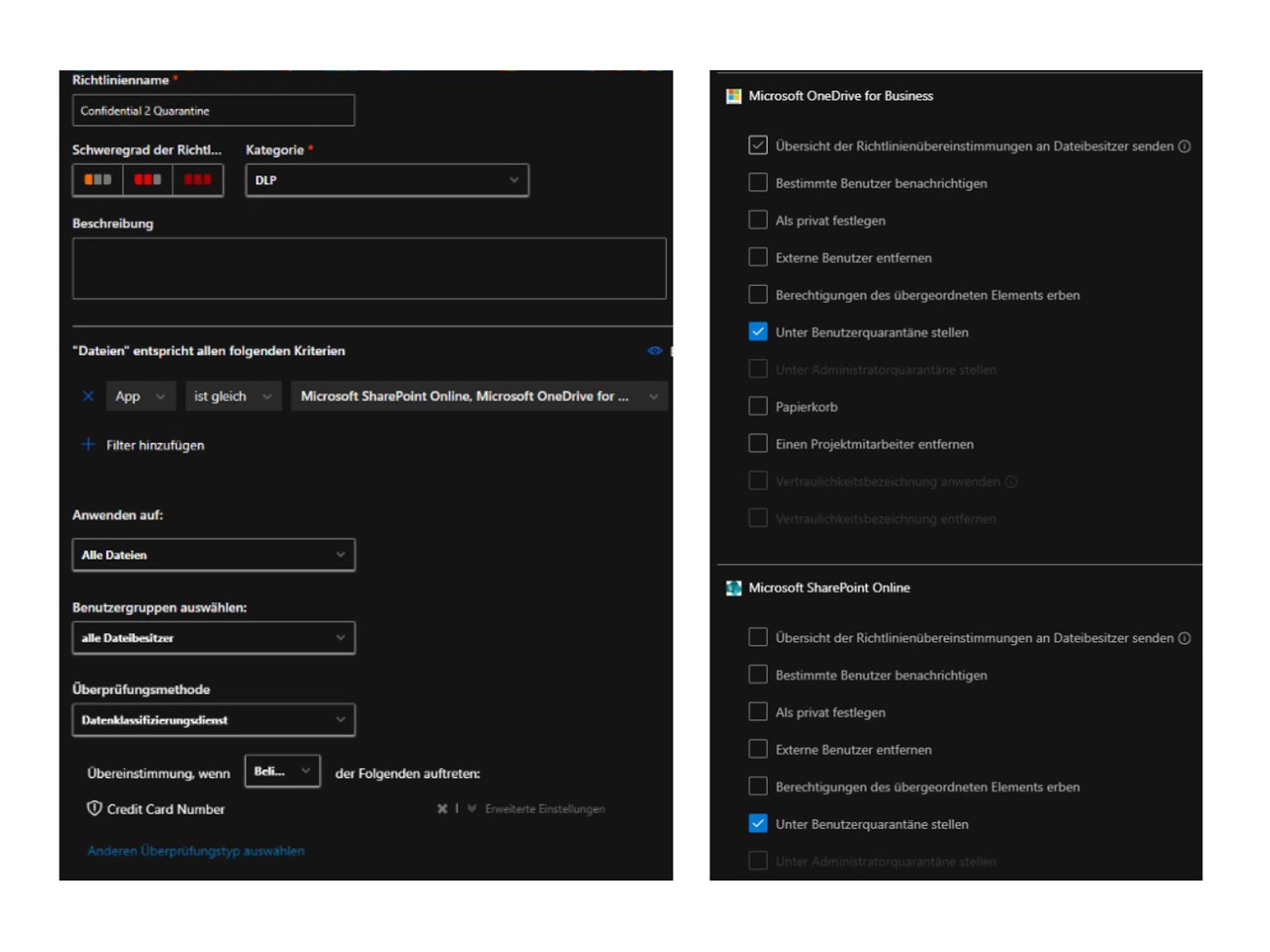
    • Name: "Confidential 2 Quarantine"
    • Filter > Apps: = e.g. OneDrive, SharePoint
    • Verification method: Data classification service > Verification type > Type of confidential information (or a more suitable alternative – see above)
    • Apps: = e.g. OneDrive, SharePoint
    • Governance actions:
      • Place in user or admin quarantine
      • Wastepaper basket
         
  4. Screenshots from the tool
    Screenshots of policy management in Microsoft Defender for Cloud Apps

Example: File with corresponding content in OneDrive

A user accidentally saves a file with recognisable content to their OneDrive. MDCA recognises the file, triggers the policy and automatically moves it to quarantine. The user receives a notification with a reference to the policy.


Monitoring & Reporting

Actions performed by file policies can be tracked in the governance log in the MDCA.
Security Admin Centre > Cloud Apps > Governance Log


Conclusion

The combination of Defender for Cloud Apps and various detection methods, such as Sensitive Info Types + Co, offers a powerful way to detect sensitive data. With appropriate policies in place, violations can be automatically detected and remedied before they become a security risk.


Further sources & information on this topic:

Integrating Microsoft Data Classification Services - Microsoft Defender for Cloud Apps | Microsoft Learn
Working with the RegEx engine - Microsoft Defender for Cloud App | Microsoft Learn
Creating a digital document fingerprint - Microsoft Purview | Microsoft Learn
Getting started with trainable classifiers - Microsoft Purview | Microsoft Learn


A holistic approach to security: Telekom's consulting services

Modern IT and cloud scenarios place new demands on security, governance and operations. Telekom's consulting services on Microsoft security help you analyse your environment in a structured manner and develop it in a targeted way – from initial classification to concrete implementation.

Start with a no-obligation orientation meeting or a Microsoft 365 Security Assessment and receive clear recommendations for action to improve security.

Your contact for questions and advice

Do you have questions about Telekom's Microsoft service offering or would you like personal advice? Simply contact our experts without obligation using the consultation form.

Telekom: Your partner for the entire Microsoft world

Licences & Software

All Microsoft licences from a single source – simple, secure and reliable.

übergreifend-Teaser-Telekom-Partner-Lizenzen-Software-Link-CMP

Free support

We are always there for you: quick assistance, personal support – at no extra cost.

Contact

Tested quality & safety

ISG and Microsoft-certified services for maximum security and reliability.

About the Microsoft portfolio
Image shows Telekom author Julien Cléro discussing Microsoft Copilot.

Author: Marcus Henker

Marcus began working with Microsoft Office 365 in 2014. Since then, he has focused on various projects and supported customers from a wide range of industries. In recent years, Marcus has concentrated on Microsoft security issues.