To the page content
Security Cave Blog

Windows Firewall: Securing cloud-only clients correctly

Cloud-only managed Windows clients often use the wrong firewall profile. How Network List Manager helps to activate the domain profile correctly.

Two people analyse source code on large monitors, one points at the screen.

In brief

  • In cloud-only scenarios (Entra ID only, Intune management), Windows clients remain permanently in the public firewall profile without additional configuration, which is unsuitable for internal exceptions.
  • The Network List Manager feature in the Intune firewall profile can be used to define TLS authentication endpoints where the client recognises that it is on an authenticated or corporate network.

If clients go cloud-only, remember the firewall profiles...

With more and more companies, I am moving towards cloud-only management for client devices, including Entra ID Only Autopilot, complete management via Intune and other measures.

One issue that is sometimes overlooked here is the Windows Firewall. Without the appropriate configuration, clients will permanently assume that they are on a "public network" and thus keep this firewall profile active. This means that the corresponding exceptions, even for processes that are only required internally, would then have to be placed on the public profile. This obviously does not sound like the right approach. So what is a better solution?

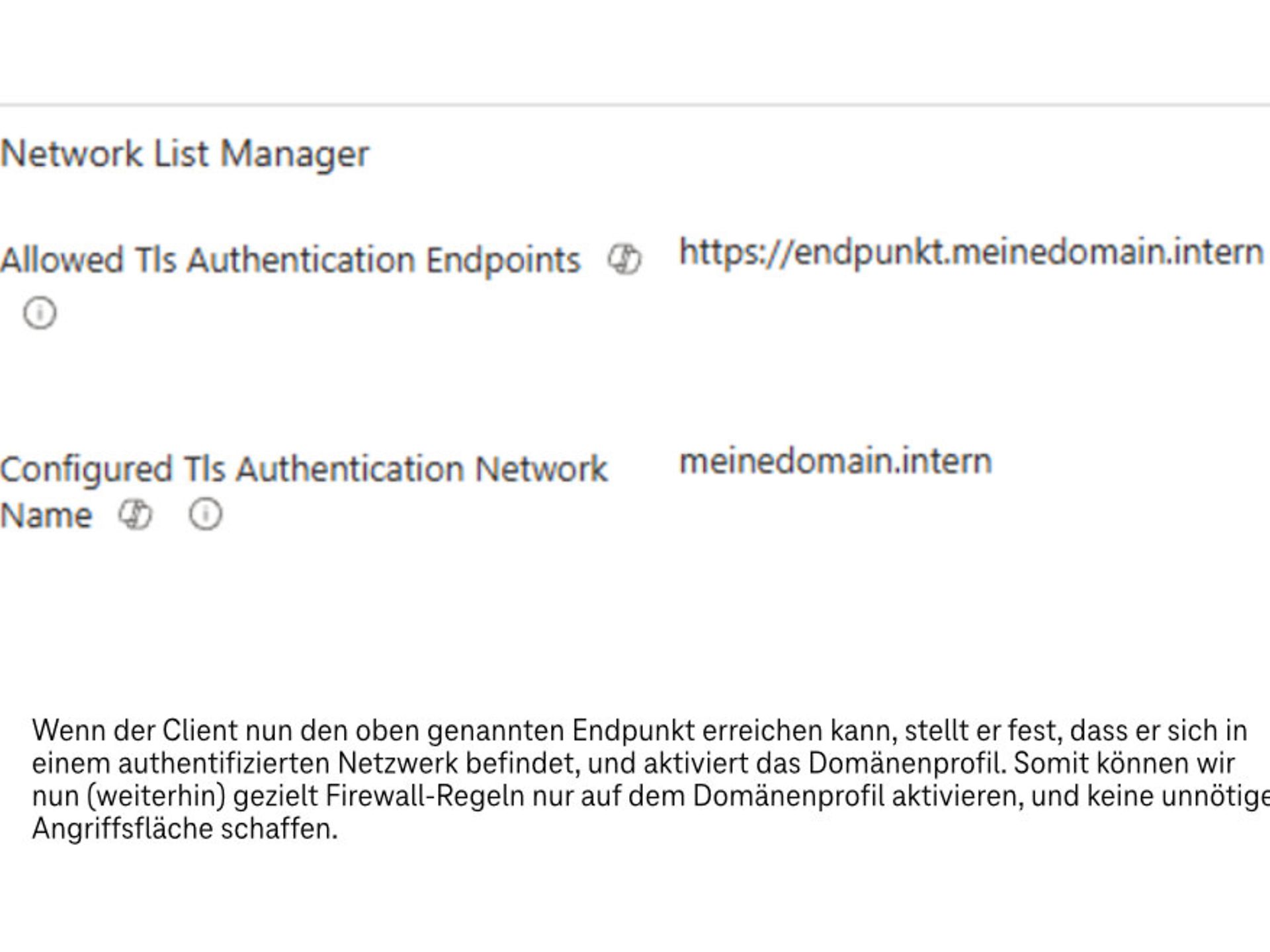
The solution is the Network List Manager function. This allows us to assign endpoints that the client can use to determine that it is in an "authenticated network" when it is accessible. One way to configure these settings can be found in the firewall profile under Endpoint Security:

Screenshot of "Network List Manager" from the Windows Firewall configuration settings

A holistic approach to security: Telekom's consulting services

Modern IT and cloud scenarios place new demands on security, governance and operations. Telekom's consulting services on Microsoft security help you analyse your environment in a structured manner and develop it in a targeted way – from initial classification to concrete implementation.

Start with a no-obligation orientation meeting or a Microsoft 365 Security Assessment and receive clear recommendations for action to improve security.

Telekom: Your partner for the entire Microsoft world

Licences & Software

All Microsoft licences from a single source – simple, secure and reliable.

übergreifend-Teaser-Telekom-Partner-Lizenzen-Software-Link-CMP

Free support

We are always there for you: quick assistance, personal support – at no extra cost.

Contact

Tested quality & safety

ISG and Microsoft-certified services for maximum security and reliability.

About the Microsoft portfolio

Your contact for questions and advice

Do you have questions about Telekom's Microsoft service offering or would you like personal advice? Simply contact our experts without obligation using the consultation form.

Image shows Telekom author Julien Cléro discussing Microsoft Copilot.

Author: Marcus Henker

Marcus began working with Microsoft Office 365 in 2014. Since then, he has focused on various projects and supported customers from a wide range of industries. In recent years, Marcus has concentrated on Microsoft security issues.