Telephone contact
You can reach us by telephone at any time.
Frequently asked questions and answers about Microsoft's new rights and roles concept and how the concept is being implemented in Telekom customer service.

How can I protect my company from attacks? How can I reduce the potential damage in the event of a successful attack? These are just two of the questions that companies should be asking themselves in light of increasing cyber attacks and security-related incidents. The threats to which companies and their systems are exposed are not just theoretical, but real and immediate.
One approach that is frequently discussed and applied in this context is zero trust. This approach assumes that every activity in an IT environment – even those carried out by users classified as trustworthy – is a potential threat. Therefore, when defining security policies, the rule should always be: trust no one.
One consequence of this is to grant access to IT environments only with the minimum necessary rights (functional and temporal). This principle is now also being implemented in the management of Microsoft customer environments in connection with the provision of Telekom customer services.
To this end, Microsoft introduced a new rights and roles concept in June 2022: customer service now has access to customer environments with much more differentiated rights. This new rights and roles concept is called GDAP.
Find out exactly what this term means and how the concept is implemented in Telekom customer service here.
DAP stands for Delegated Administrator Privileges. With DAP, your Microsoft CSP partner can access your Microsoft environment via the role of a global administrator. This enables the CSP partner to quickly identify problems, qualify solutions and thus provide rapid assistance.
GDAP stands for Granular Delegated Administrator Privileges. GDAP can be used to restrict access to a Microsoft environment in terms of functionality and time. This means that customer service only has access to the areas required for troubleshooting. This access can also be restricted in terms of time.
If Telekom had booked licences for you via the Telekom Cloud Marketplace, customer service was previously able (until 31 October 2023) to access your customer environment via DAP access. This authorisation made it possible to provide support quickly and efficiently.
With a few exceptions, all existing Telekom customers were switched to GDAP by 1 November 2023, provided that DAP authorisations were in place beforehand. This ensured that your access runs under the best current security concept and that customer service can be there for you with the usual quality.
Existing customers: If Telekom books licences for you via the Telekom Cloud Marketplace, customer service will normally already have a GDAP relationship. Roles are assigned to this GDAP relationship. By default, these roles have fewer and more granular rights than in the past with DAP.
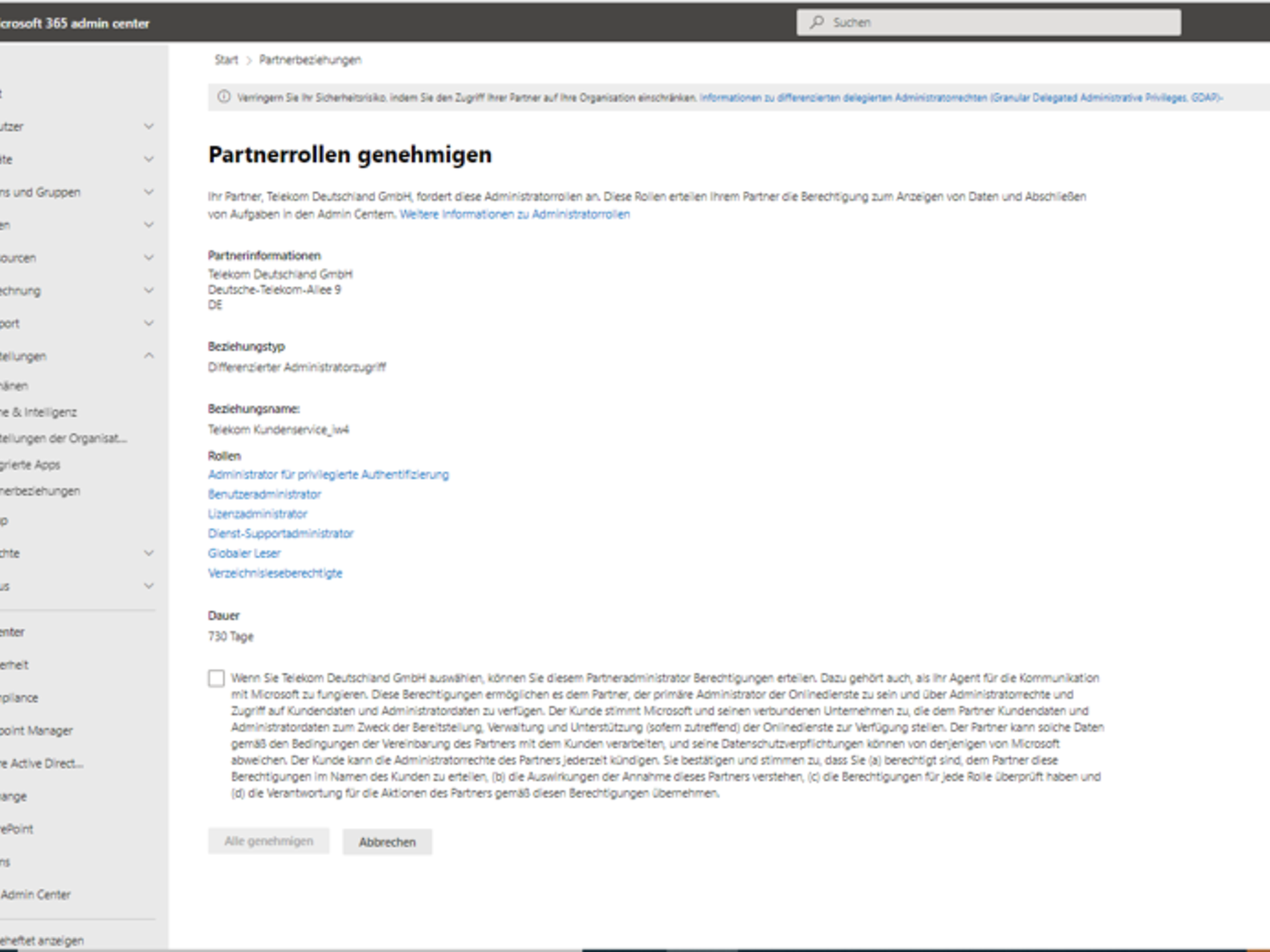
New customers: When Telekom books licences for you via the Telekom Cloud Marketplace for the first time, you will receive an email in addition to the order confirmation, asking you to click on a link to the Admin Centre to approve the granting of GDAP rights. This approval must be carried out via an administrator account. The GDAP relationship is then established.
A wide range of Microsoft Entra ID roles are available for the various activities that can be performed within a Microsoft environment. To enable Telekom customer service to provide you with efficient support, the following GDAP roles are automatically assigned to you when you first book a Microsoft product:
Other roles
In order to set up your customer environment or troubleshoot problems, Telekom Customer Service usually requires temporary elevated privileges on your environment. Customer Service will send you an individual request specifying the required roles and duration. Only after you have agreed to this request will our service be able to access the requested areas and provide the service.
On the linked page, you will find an overview of all available Entra roles. Microsoft also provides another overview in which the tasks are listed according to the corresponding Entra roles.
At present, GDAP rights can be granted for a period of up to 730 days. The "Auto-Extend" function (automatic extension of the GDAP relationship) is automatically activated for GDAP relationships. This extends expiring GDAP relationships by 6 months at a time. GDAP rights can be terminated by you or by customer service. Please be sure to note the section "Can I remove the GDAP relationship?" as removing GDAP relationships or deactivating Auto-Extend will affect the support provided by Telekom.
No, that did not happen. To switch to GDAP, you must provide confirmation in the Microsoft 365 Admin Centre. In the event of a support case, a GDAP relationship must first be established manually together with you. We recommend approving a minimum set of roles to ensure smooth customer service and bookings.
The GDAP relationship is required for the proper operation of the Telekom Cloud Marketplace and for support. If you remove the relationship, customer service will no longer be able to assist you efficiently with any issues that may arise. For example, support tickets could no longer be submitted.
If you have accidentally deleted or removed the GDAP authorisation, please contact customer service, who will be able to establish a new GDAP relationship with you.

No. This role remains a basic requirement for purchasing Microsoft Azure through Telekom. This is due to Microsoft's current product model. Removing this role will result in Telekom terminating your Azure resources. This rule is also specified in our terms and conditions.
To view the current status of access permissions to your Microsoft environment, log in to the Microsoft 365 Admin Centre with your administrator role.
There, on the left-hand side under the "Settings" > "Partner relationships" tab, you can view and manage your existing access permissions.
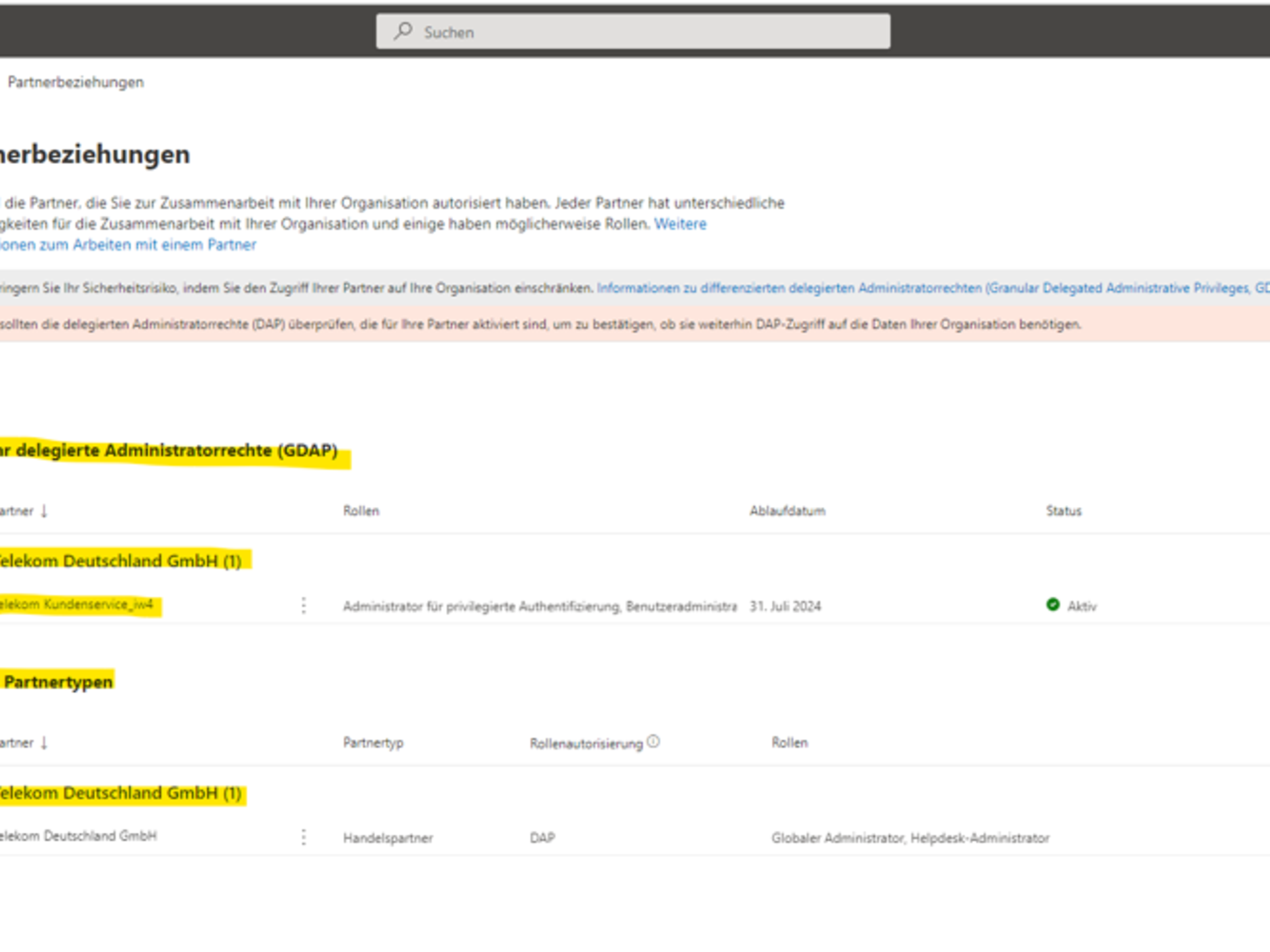
Note: Before revoking permissions at this point, please consider the possible consequences this may have for booking options and the provision of our customer service.
Every request for access authorisation is created by your CSP partner; you cannot initiate this yourself. You can approve a new GDAP relationship in your Microsoft 365 admin centre via the link sent by your partner.
Using Microsoft Entra ID and the security features of Microsoft 365, you can enable essential security measures, such as multi-factor authentication (MFA) or conditional access policies, to better secure your employees’ access. In addition, you have the option to purchase additional solutions from Microsoft, such as Microsoft Defender for Business. This offers advanced features for improved endpoint security.
Furthermore, Telekom’s experts can support you with all aspects of security for your Microsoft environment, for example with the implementing Microsoft-specific security settings for Microsoft 365 Apps for Business, Basic and Standard, and Office 365 Enterprise based on a regular security report, or with managing IT policies for your Enterprise editions.
As an existing Telekom Cloud Marketplace customer, our certified premium support is available to assist you with any questions you may have regarding topics such as booking, invoices and payment methods.
Monday to Friday, 8 a.m. to 8 p.m.
We are glad we could help!
Please feel free to use our contact channels at any time so that we can resolve your issue.