Microsoft Azure
IT resources and platform services at the touch of a button – flexible and scalable from the Microsoft data centre network.
Microsoft Azure is a cloud computing platform for businesses and offers an integrated and growing collection of IaaS and PaaS services. The right cloud solution helps you respond to changes more easily, intelligently and flexibly, ensuring you always have the right IT support. Using cloud platforms such as Microsoft Azure offers many advantages: they are more secure, reliable and flexible than local servers – and you only pay for what you actually use. On this page, we have summarised the most important questions and answers about Microsoft Azure and how you can book the cloud offering through Telekom.
Microsoft Azure is a cloud computing platform for businesses and offers an integrated and growing collection of IaaS and PaaS services. The right cloud solution helps you respond to changes more easily, intelligently and flexibly, ensuring you always have the right IT support. Using cloud platforms such as Microsoft Azure offers many advantages: they are more secure, reliable and flexible than local servers – and you only pay for what you actually use. On this page, we have summarised the most important questions and answers about Microsoft Azure and how you can book the cloud offering through Telekom.

Microsoft Azure is a cloud computing platform for businesses and offers an integrated and growing collection of IaaS and PaaS services. These include, for example, cloud services for the development, provision and operation of applications.
The Microsoft Azure portfolio includes IaaS services such as virtual machines and networks, serverless computing and storage, as well as PaaS services such as security services (Azure Active Directory, Azure Firewall, etc.), SQL and non-SQL databases, machine learning, AI, IoT and container services (Kubernetes, Docker, etc.).
With its Azure cloud solution, Microsoft is one of the global market leaders in cloud computing. The service is scalable and future-proof thanks to continuous innovative development.
All Azure services are available at an affordable price: Book the Microsoft Azure services you need from Telekom and benefit from our German-speaking customer service.
With its very wide range of cloud services, has the right offering for every target group and every size of company. This includes basic infrastructure services such as virtual machines, compute services and networking, various developer offerings such as App Service, DevOps and test environments, as well as database and storage solutions. Azure's services also cover a wide range of future technologies such as the Internet of Things, artificial intelligence and mixed reality.
With a comprehensive range of Infrastructure-as-a-Service, Platform-as-a-Service and Software-as-a-Service offerings, companies receive the right support for virtually all application scenarios. The advantages of rapid provision of scalable resources are important when setting up and operating evaluation environments. Furthermore, the production environment can be adapted to changing requirements at any time by adding or removing individual resources, thus ensuring effective utilisation. This not only enables resource-efficient IT operations, but also optimises IT costs, as you only pay for what you need and use. Microsoft Azure is therefore suitable for all types of businesses – from small start-ups to large corporations.
For many industries and companies, security, data protection and compliance are among the most important factors before deciding to move to the cloud. Microsoft's cloud platform not only complies with current laws and regulations on data security and data protection, but also offers high compliance standards. This is underlined by its extensive certification portfolio, which includes: C5 Catalogue (Cloud Computing Compliance Controls Catalogue), ISO 27001, FEPRA and ISO/IEC 27701. It also includes certifications and compliance with standards from specific industries such as finance and healthcare.
You can find comprehensive information about data protection at Microsoft on this page.
To use Azure, you need an Azure subscription, which you can request via the Telekom Cloud Marketplace or your Telekom contact person. Telekom's Azure cloud experts will be happy to assist you with any questions you may have about Azure subscriptions and booking.
To manage and use Microsoft Azure, you need access to the Internet and an up-to-date browser. You can access the Azure services you require, such as a virtual machine, via a VPN connection or a dedicated line (e.g. Express Route).
When you use Microsoft Azure from Telekom, you benefit not only from the advantages offered by innovative IaaS and PaaS services, but also from German-speaking customer service provided by Microsoft-certified Telekom experts.
As standard, our experts are available by telephone or email Monday to Friday from 8 a.m. to 8 p.m. and Saturdays from 8 a.m. to 4 p.m. to answer any questions you may have. This does not include public holidays. If required, we are also happy to offer you additional individual support services for the planning phase, setup or operation of the various Microsoft Azure services. Fault reports are, of course, accepted around the clock.
Microsoft Azure from the Telekom Cloud Marketplace – your advantages:
A minimum contract term of one month applies to the use of the various Microsoft Azure services. However, with the pay-as-you-go model, you can reduce your use of Azure resources at any time. The resources used up to that point will then be billed at the end of your contract term.
When booking reserved instances, you decide on the term for which you would like to book the resources. Terms of 1 or 3 years are available. The term is then binding.
Azure uses a pay-as-you-go billing model. This means you use the service first and pay for your usage afterwards. Billing takes place monthly via your chosen payment method. Keep track of your accumulated costs in your personal usage overview in your Telekom Cloud Marketplace account or via Microsoft cost analysis directly in the Azure portal.
When using Reserved Instances, the desired service can be paid for on a monthly basis or as a one-off payment.
We offer the following payment methods for all Telekom Cloud Marketplace solutions:
Telekom invoiceAs
a business customer with an existing Telekom landline contract, you can have Telekom Cloud Marketplace solutions billed directly to your landline invoice. To set this up, please have your Telekom login details ready (these were provided to you for logging into the customer centre).
Telekom mobile phone billing (SDP)
As a business customer with an existing Telekom mobile phone contract (postpaid), you can have Telekom Cloud Marketplace solutions billed directly to your mobile phone bill. Please have your mobile phone ready for setup. You will receive a one-time password via text message, which you can use to authorise the payment.
PayPal
You can conveniently pay for Telekom Cloud Marketplace solutions via PayPal. You will be redirected to the PayPal login page. Please enter your email address or mobile phone number and your password. You will be billed using the payment method you have stored with PayPal (direct debit, giropay, credit card or your PayPal balance).
Credit
cardWe accept Visa, MasterCard, Diners Club/Discover Card and JCB. Select your card type and enter your credit card details.
Direct debit
Please enter your contact details and bank account information in the appropriate fields. Acceptance is subject to a positive plausibility and credit check.
With Azure Plan, you can now use Microsoft cost analysis directly in the Azure Portal. Cost analysis provides you with an overview of your consumption and the resulting costs. You can display this overview for various predefined and user-defined time periods.
The feature is activated immediately upon booking Azure access. You can find the feature by searching for "Cost management + billing". Under "Cost management + billing", select Cost management and then Cost analysis.
No final invoices are stored in the Telekom Cloud Marketplace – the marketplace provides you with an overview of all your transactions and supporting documents. Depending on your chosen payment method, you will receive your invoices by post or email. If you use one of Telekom’s payment methods, you can also view your invoice in the Landline Customer Centre or via the Mobile Bill Online service for business customers.
The documents accompanying the invoice also include a detailed breakdown (statement) of the various items in your Azure plan. You can access these documents as follows:
1. Log in the Telekom Cloud Marketplace using an administrator account (company or billing administrator).
2. Go to the 'My Account' section.
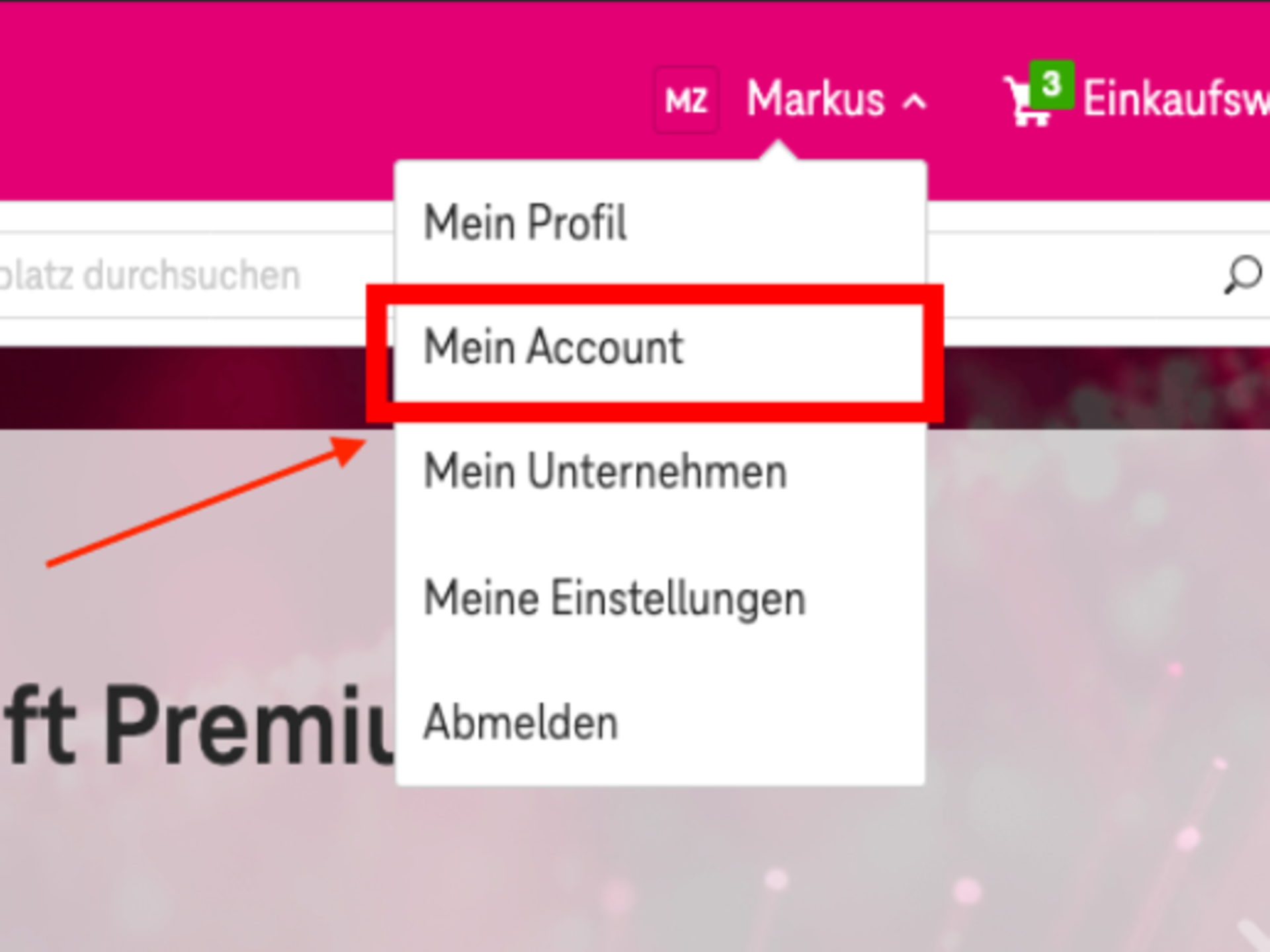
3. You can then access your bookings via the ‘Invoicing’ tab, where you can view the supporting documents for the invoices.
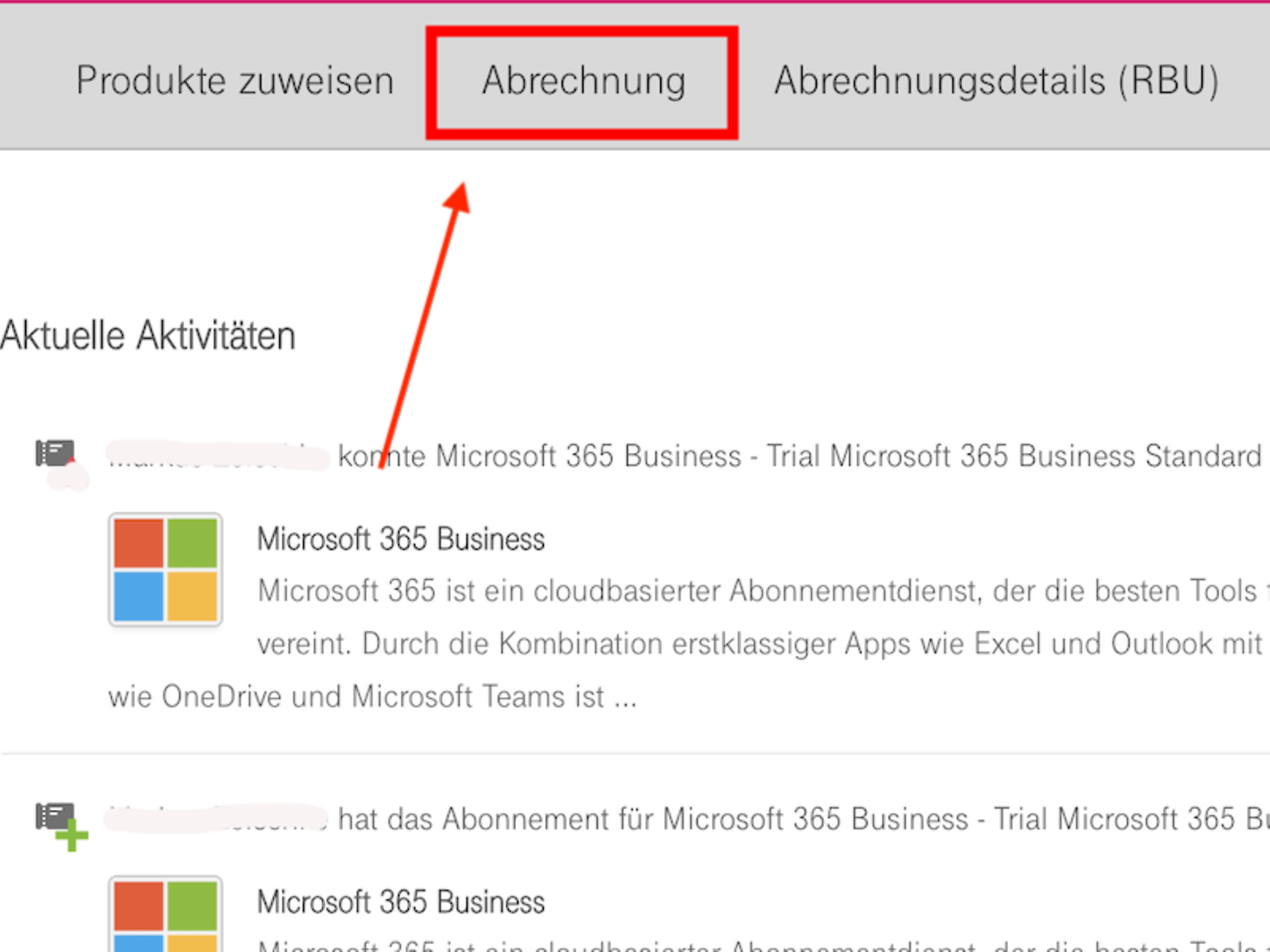
In future, you will receive more details about the Azure services you use directly in the individual line items on your invoice. The following line items will be displayed: Compute, Storage or Databases with your costs via all subscriptions across all subscriptions in your Azure plan. In detail, a billing line item might then look as follows:
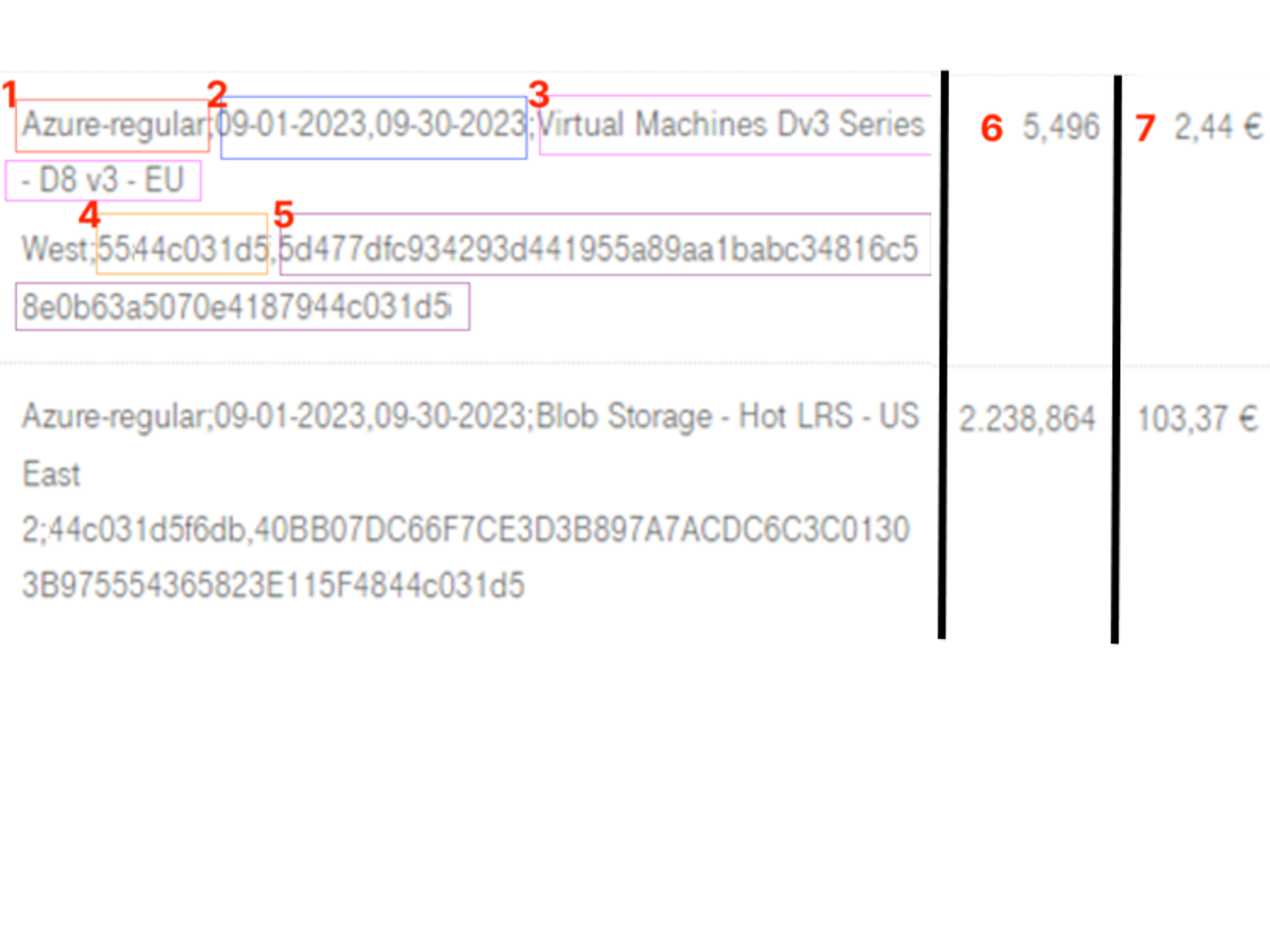
The invoice line provides the following information:
Please note that this invoice summary will not show your costs broken down by Azure subscription. If you require detailed cost information based on individual subscriptions within your Azure plan, you can view this via the cost analysis tool in the Azure Portal. This will be activated by our Telekom support team when you first purchase an Azure plan via the Telekom Cloud Marketplace.
The GK invoice contains two line items. You will receive one total amount covering the Pay-As-You-Go services consumed under your Azure Plan and a separate amount for any reservations used within the Azure Plan.
If you are not using any reservations, your invoice will appear in the following format:
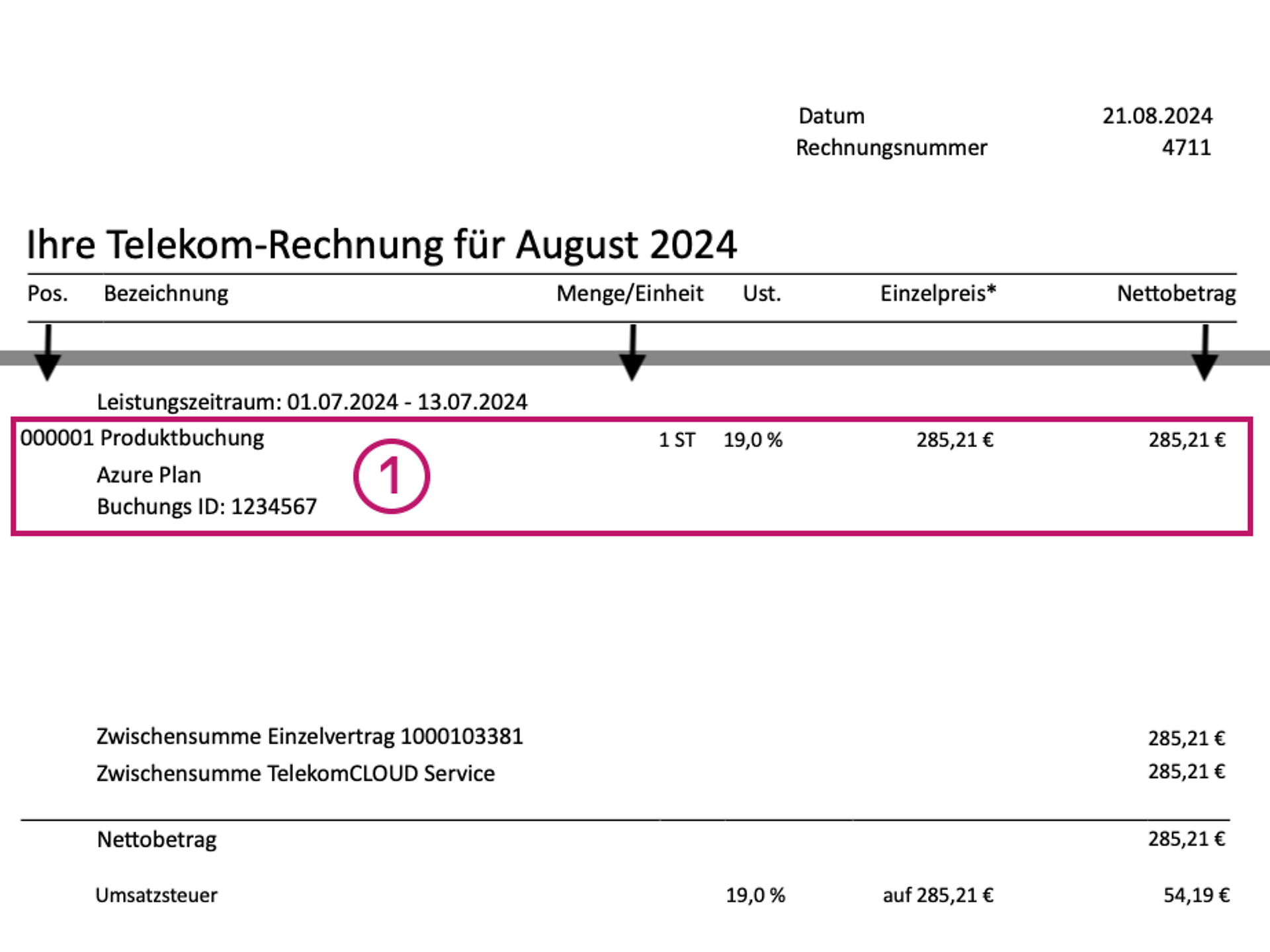
If you require detailed cost information at the individual subscription level, this information is available in the invoice supporting document or through Cost Management in the Azure portal.
Microsoft Cost Analysis is a collection of FinOps tools that enable you to analyse, monitor and optimise your Microsoft Cloud costs. Anyone with the "Billing Reader" role or higher permissions has access to Cost Analysis. It is part of Azure access and is automatically activated for new customers when they first book an Azure plan in the Telekom Cloud Marketplace.
You can easily access the Cost Management section in the Azure Portal via the main menu. Simply select Cost Management + Billing.
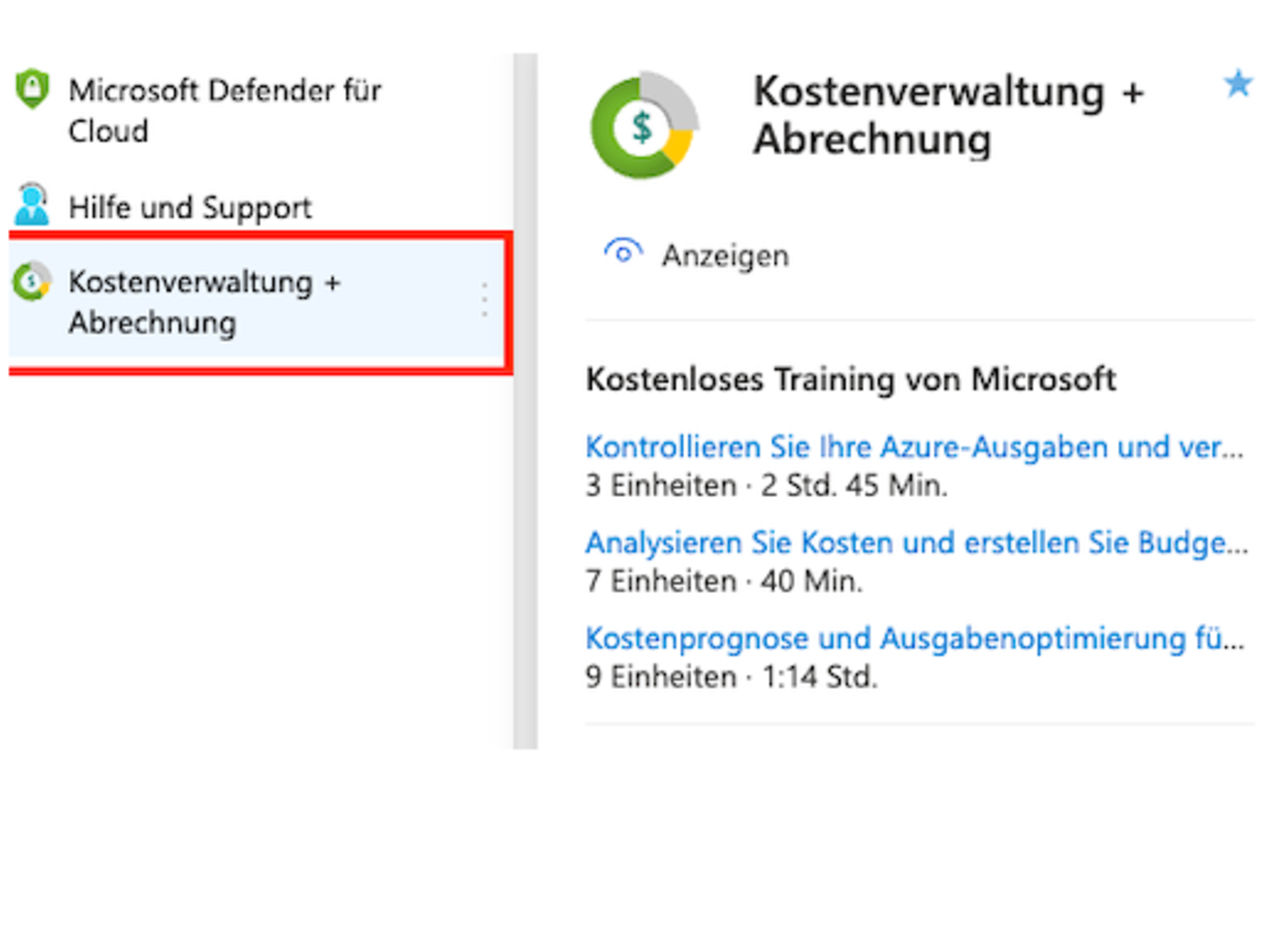
The functions available to you there include the following options:
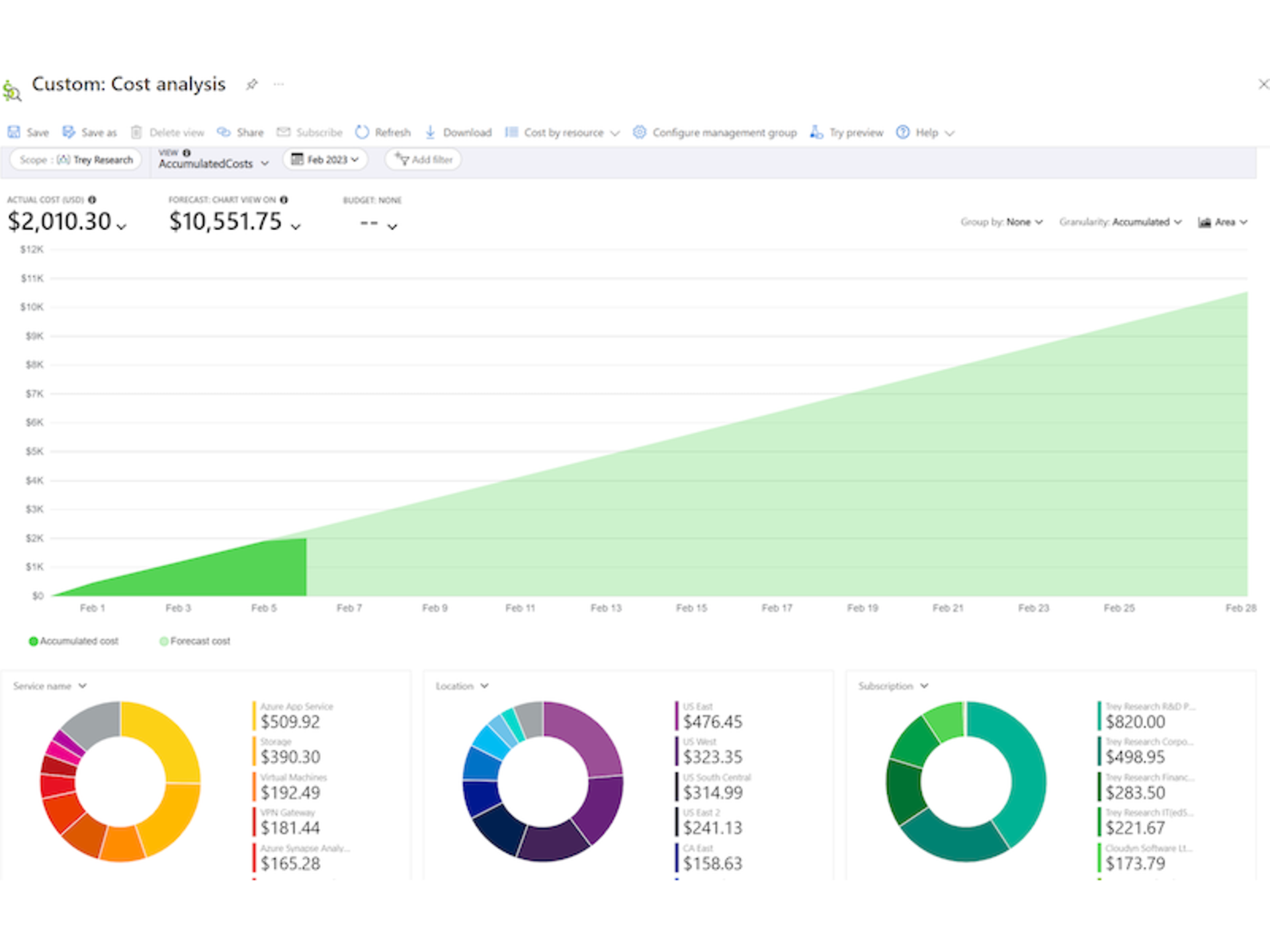
Please note that the Azure Portal displays the costs from Microsoft's perspective that you generate with the various Azure services and applications – without taking into account any discounts or surcharges that Telekom may grant.
Do you need a detailed overview of your bookings? The
invoice-related documents (RBU). You can find the necessary RBU tool in the
Telekom Cloud Marketplace:
You can find information on the types of reports you can generate, important things to consider, and many other useful questions and answers in our FAQ on invoices.
Once you have completed your Microsoft Azure booking, you will now be able to use the cloud platform's more than 200 services. You can use the Azure Portal as a central point of contact, where you can configure all the important settings for your Azure subscription – for example, creating users, assigning rights and booking resources.
If you book Azure in an existing Microsoft tenant, you can log in to the Azure Portal with your existing administrators and the access data already available for them. Once logged in as an administrator, you can manage users, groups, domains and permissions. In addition, the original first user of your Microsoft tenant is also assigned the rights as owner of the Azure subscription. With the owner's rights, you can then book and manage Azure resources.
If Azure is your first product in your tenant, you will also receive your access data by email when you book for the first time. In this case, this first user is assigned the role of owner of the Azure subscription in addition to the administrator role. You can find out more about roles and rights in the FAQ "Creating user roles and users" below.
Microsoft Azure offers both paid and free services. Costs are only incurred in your booking when you use paid Azure services. You can find out more about costs and cost control in the FAQ "How can I keep track of my costs?".
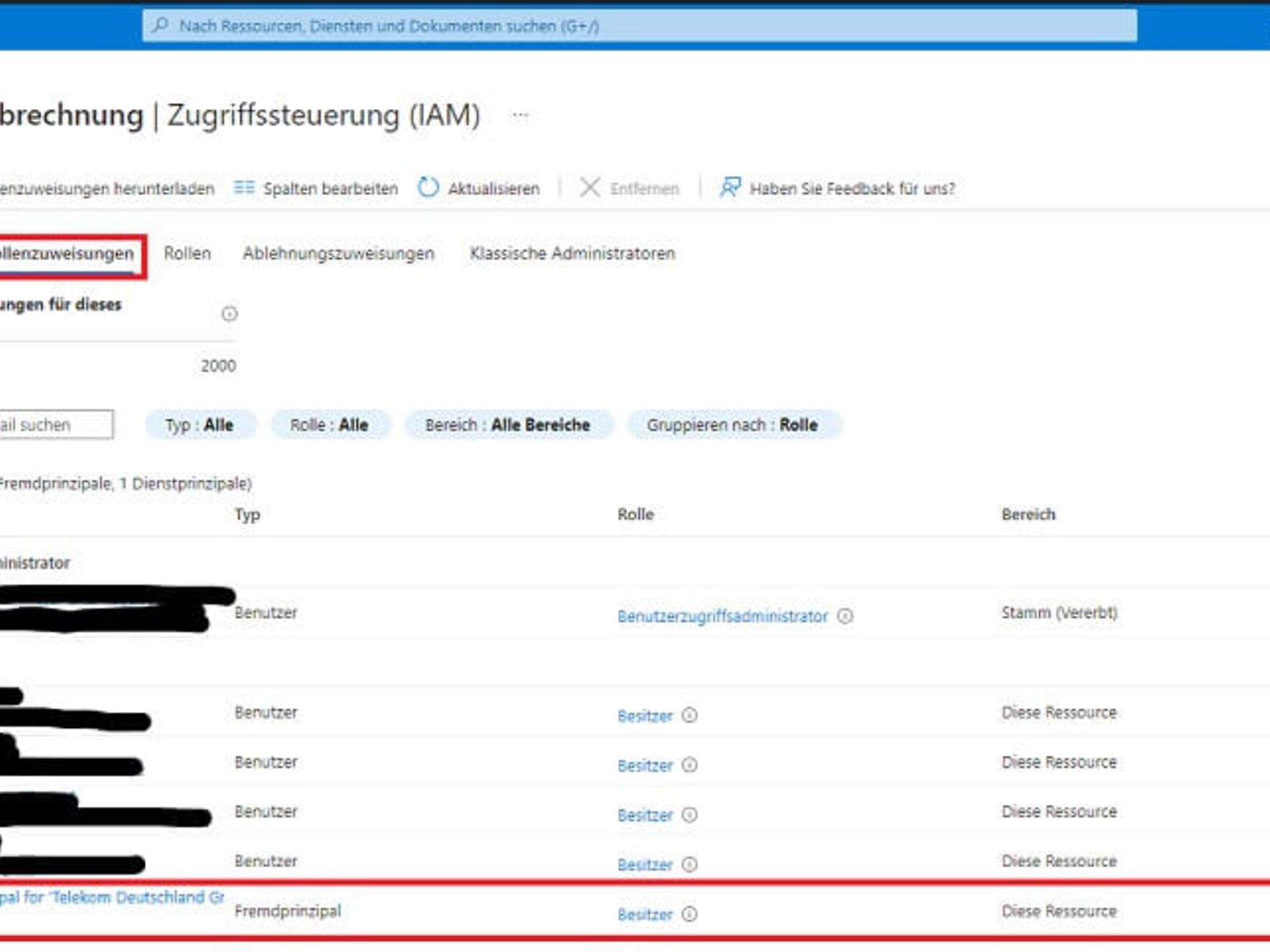
Important: The so-called foreign principal role has already been assigned to Telekom in your Azure subscription. Telekom requires this role in order to provide you with support for your booking. Due to Microsoft's current product model, this role is a basic requirement for booking Microsoft Azure via Telekom. Removal of this role will result in Telekom terminating your Azure resources. This rule is also specified in our terms and conditions.
The Azure Portal is the central console that allows you to manage your Azure subscription. It is web-based and offers a graphical user interface, making it a good alternative to command line tools that you could also use to manage your Azure subscription. In the portal, you can create, manage and monitor a wide variety of components – from simple web apps to complex cloud deployments.
In the top right bar, you will find a range of options that make it easier for you to get started with the Azure Portal and provide relevant information at a glance. Among other things, you can use these useful elements:
Another useful feature of the Azure dashboard is that it can be customised. The left-hand bar shows you the services offered by Azure – initially only your favourites, however. By clicking on "More services", you can see all Azure services that are available to you. Of course, you can also search for specific services using the search bar. Select the star next to each service to add the corresponding functions to your favourites bar. These will then appear on your individual home page by default.
For detailed information, please also use these resources from Microsoft:
When you sign up for your Azure subscription, the administrators of your Microsoft tenant will have access to the Azure portal to manage users, groups, domains, and permissions. In addition, the original first user of your Microsoft tenant is also assigned the rights as owner of the Azure subscription. With the owner's rights, you can then book and manage Azure resources. If Azure is your first product in your tenant, you will also receive your access data by email when you book for the first time. In this case, the first user is assigned the role of owner of the Azure subscription in addition to the administrator role.
Microsoft Azure basically distinguishes between two independent authorisation systems: Azure Active Directory and Azure resources. The biggest difference between Azure and Azure AD roles is their scope: Azure roles are used to manage access to virtual machines, storage and other Azure resources, for example. Azure AD roles are used to manage access to Azure AD resources such as user accounts and passwords.
This division allows you to use your admin access to create new users at the start, to whom you can then assign permissions for managing and controlling all your Azure resources. You can also assign these permissions and roles to existing users. To do this, you must perform the following steps:
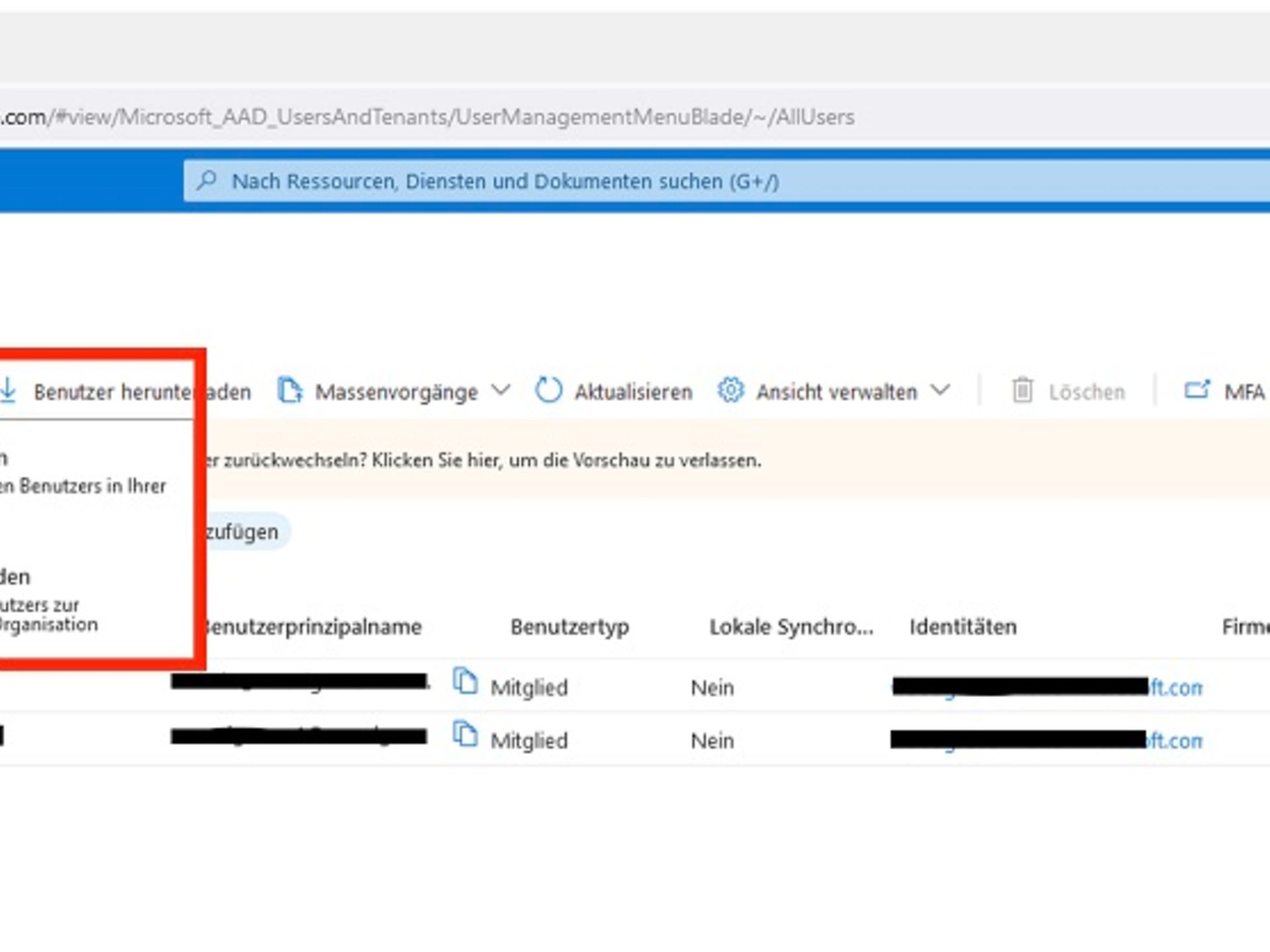
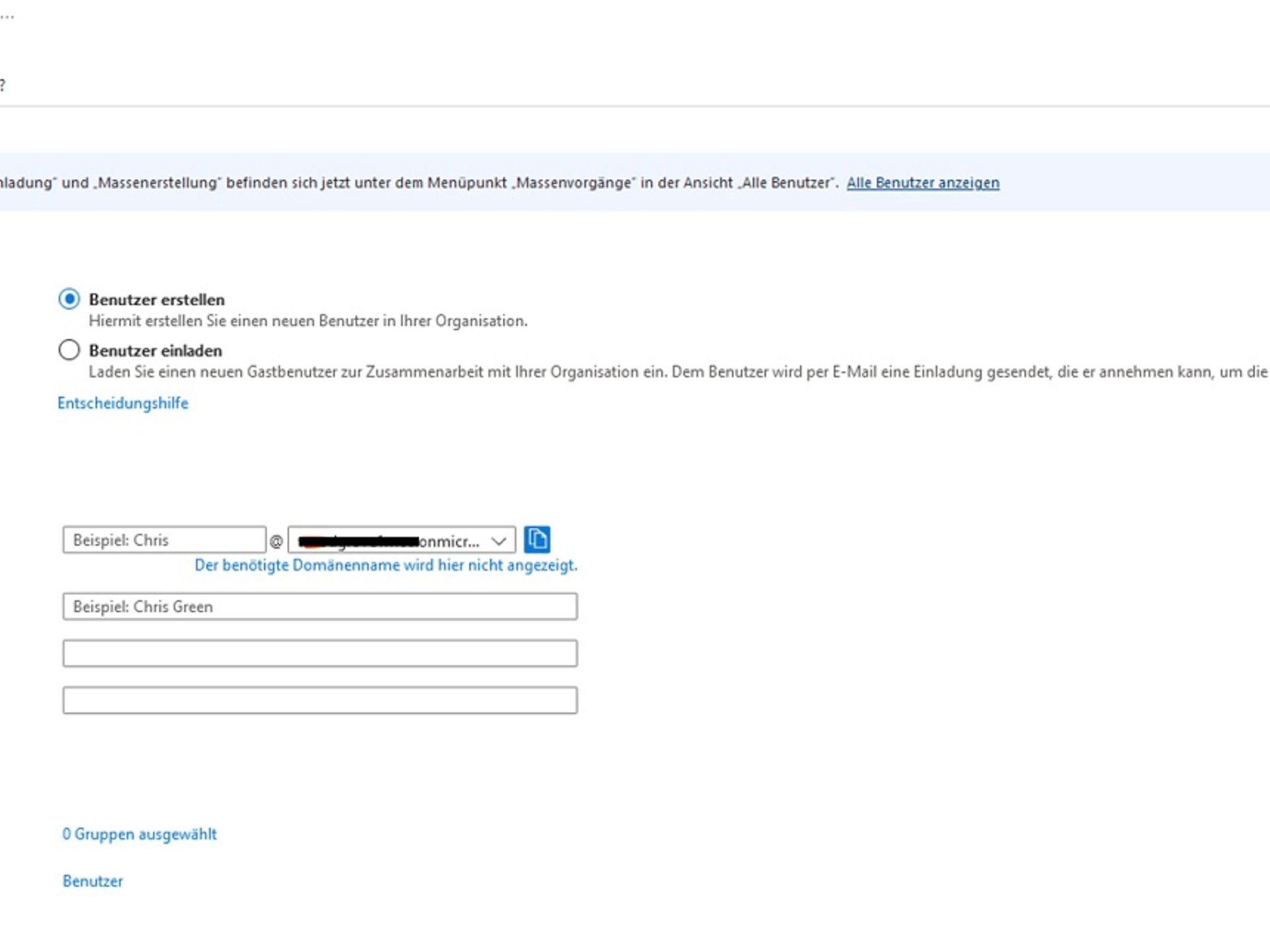
You can then add the appropriate role with the desired permissions to the new user. To do this, follow these steps:
If you want to assign roles, you must specify a scope. With Azure, you can specify a scope at four levels: management group, subscription, resource group, and resource. To do this, log in to the Azure Portal. In the top search field, search for the scope for which you want to grant access and click on the desired resource for that scope.
Roles are typically assigned via the Access Control (IAM) page – select this area. Then click on the Role Assignments tab to view the role assignments for this area, and then select Add > Add Role Assignment.
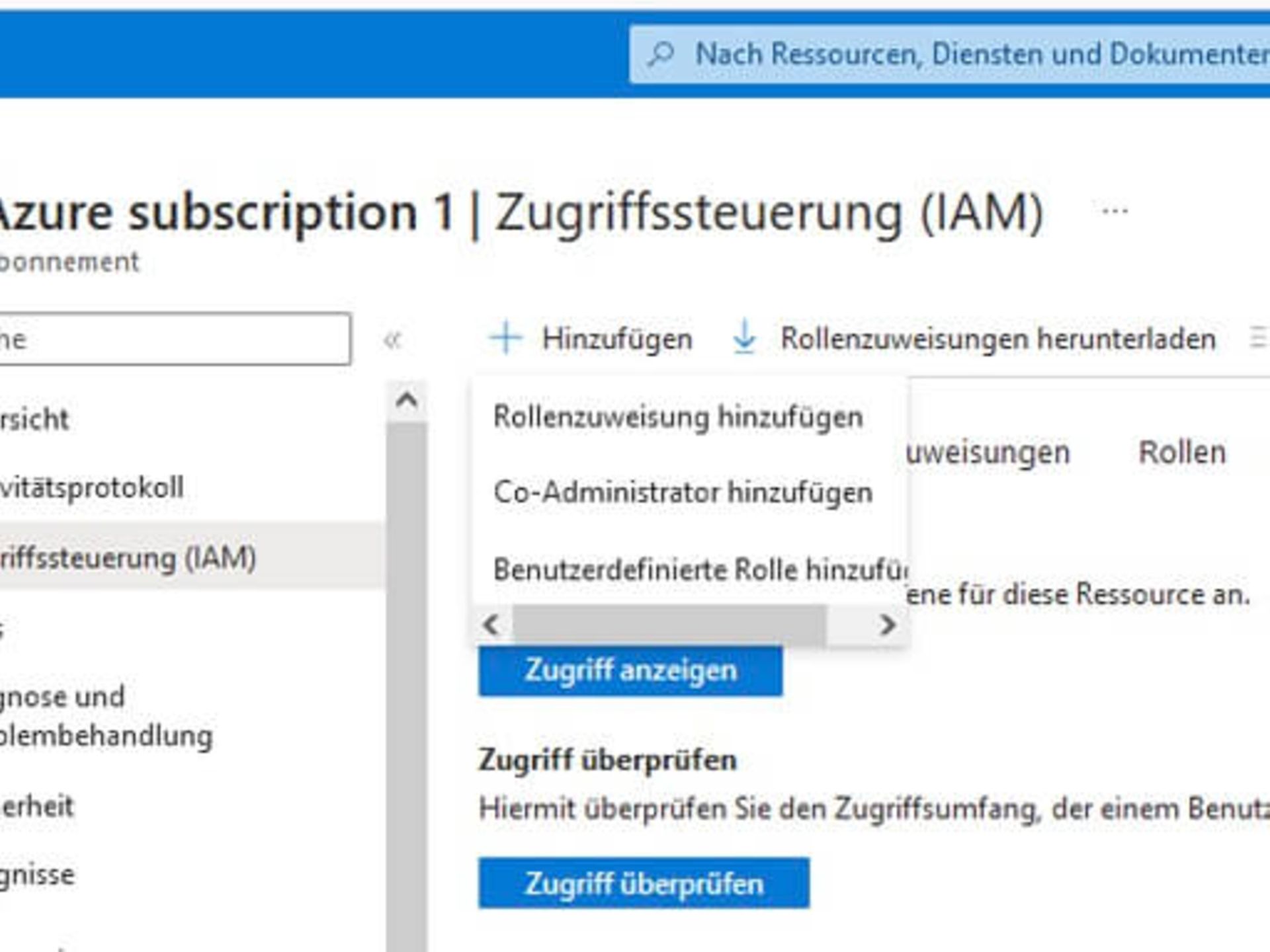
Now follow these steps:
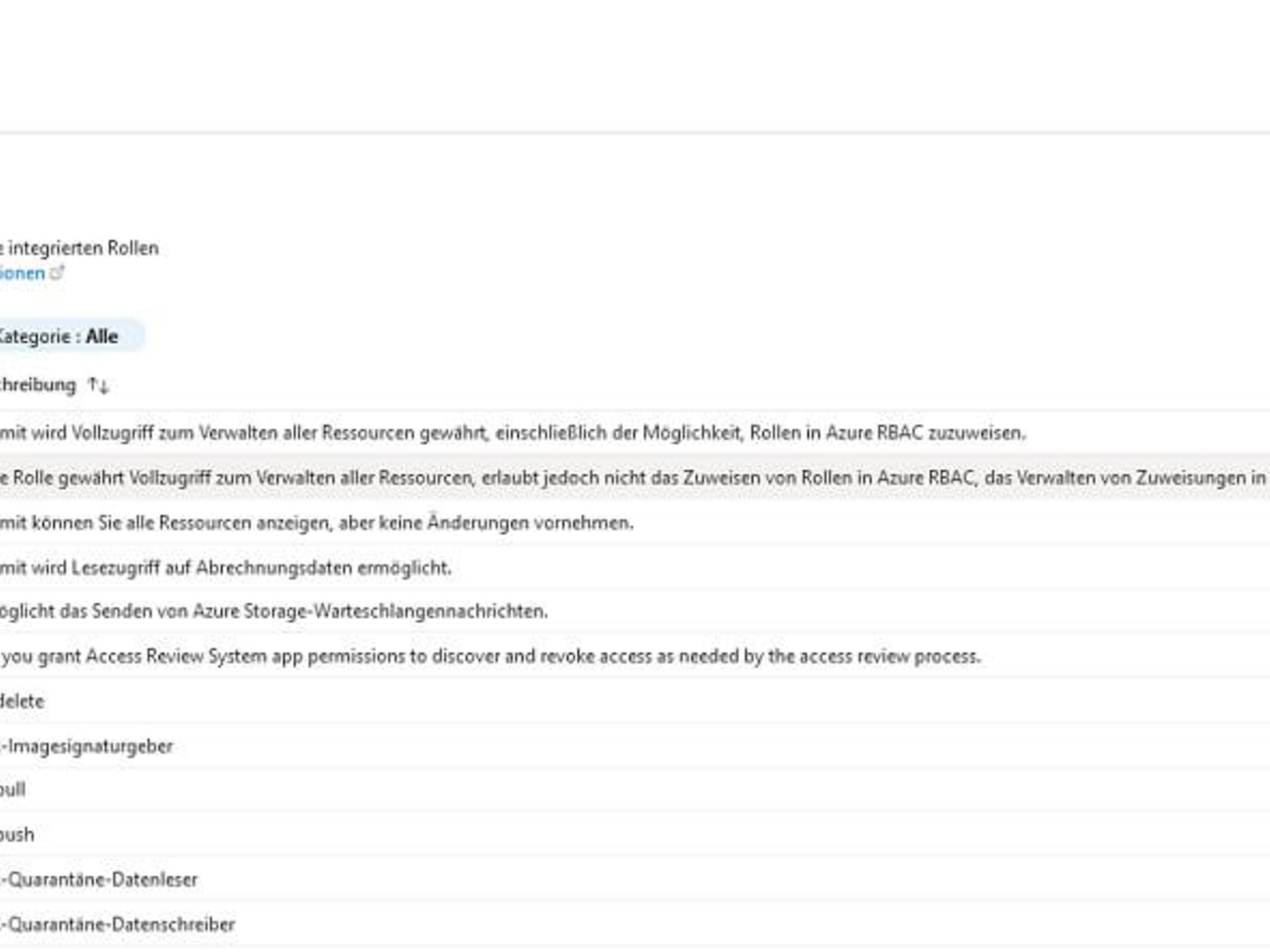
Detailed step-by-step instructions can be found in the Microsoft documentation:
Identity-related attacks such as phishing are becoming increasingly common. Most of these attacks can be prevented with multi-factor authentication (MFA). Microsoft offers the option of activating this for your users via Azure Active Directory (also in the free version).
You can activate this setting in the "User" section via the MFA per user menu item.
Once you have selected the desired users, you can then specify the authentication methods – for example, via text message or an app.
The platform logs in the Azure Portal provide you with detailed diagnostic and monitoring information for your Azure resources and the Azure platform. In the Monitoring section, you will find various types of logs. For example, logon and monitoring logs are available.
Among other things, you can view the login activity history and the monitoring log of changes made in Azure AD for a specific tenant. The logs are displayed as shown in the two screenshots:
Registration log
Monitoring log
Detailed instructions can be found in the Microsoft documentation:
Microsoft Azure offers both paid and free services. Costs are only incurred in your booking when you use paid Azure services. With paid Azure products and services, you only pay for what you actually use. As soon as you create Azure resources and then use them, you will be billed for the resources.
To help you optimise your Azure expenditure, the Cost Management + Billing feature is available, which allows you to perform the following activities, among others:
You can find details on this in the Microsoft documentation:
The Azure Portal (https://portal.azure.com/) is a web-based, central console that allows you to manage your Azure subscription and the Microsoft Azure services used through your subscription via a graphical user interface.
How do I access the Microsoft Azure Portal?
To access and use the desired Azure services, you first need an account. You can then book access to the Microsoft Azure portal via the Azure product page. Your login details for the Azure portal will then be sent to you by email. You can use these to log in to the Azure portal and get started right away.
You can find the prices for using the various Microsoft Azure services in our price overview on the Microsoft Azure product page. You can check your usage of the individual Microsoft Azure services in your personal usage overview in your TelekomCLOUD account.
What options does the Azure Portal offer?
The Azure portal provides you with various functions for managing your Microsoft Azure resources. These include, among others:
The Azure Portal is available via any Azure data centre, which means network delays can be avoided as the Azure Portal can be used via the nearest data centre. The Azure Portal is updated at regular intervals and its functionality is expanded. There is no downtime for the portal during these updates.
Microsoft provides well over 100 different Microsoft Azure cloud services via a global network of data centres spanning more than 60 regions and around 140 countries. The various Azure services are divided into two groups: regional services and non-regional services.
Regional services with local storage
A large proportion of the Azure services currently available belong to the first group and can be provided regionally. With regional services, customers can specify in which Azure region the service should be provided and thus also where the data should be stored. One of these regions is Germany, where the two data centres Germany West Central and Germany North provide various Azure services. In the Germany region, as in all Azure regions, the applicable regulations for data residency, data sovereignty, compliance and reliability are met.
However, it should be noted that not every "regional" Azure service is provided by every data centre. In particular, newer data centres usually only offer a subset of services at launch, with the range being expanded gradually. Microsoft provides details of which services are available in which data centres on its own website. There you can view a list of all services for a specific data centre and find out in which data centres a particular service is hosted.
A whole range of different cloud services are already being offered via the two new German Azure data centres. These include various infrastructure and platform-as-a-service offerings such as virtual machines, networking services, databases, storage and analytics services.
Non-regional services with no impact on storage location
For certain Azure services, you as a customer cannot select the region in which the service is provided. These services may store customer data in any Microsoft data centre, unless otherwise specified.
These services include the Azure Content Delivery Network, Azure Multi-Factor Authentication, various routing services and various AI offerings that use Bing. Microsoft explains how data is stored in the various Azure Active Directory offerings in the accompanying documentation.
A comprehensive list of all Azure services that are classified as non-regional services can also be found on the "Available Azure services by region" page.
Where exactly are the data centres for each region located?
For security reasons, Microsoft does not disclose the exact addresses of its data centres, but it does disclose the cities where they are located. The German data centres are located in Berlin and Frankfurt. The data centres for storage within the European Union are located in Austria (Vienna), Finland (Helsinki), France (Paris & Marseille), Ireland (Dublin) and the Netherlands (Amsterdam).
Further information about data storage with Microsoft Azure
A region in Azure consists of a number of data centres that are deployed within a defined area and connected via a dedicated regional network. An important factor when choosing the right region is the waiting time or latency of the services offered there. Lower latency has a positive effect on application performance.
AzureMicrosoft Azure offers you the flexibility to deploy applications where you need them, even across multiple regions, to provide cross-regional resilience. Further information on resilience can be found on a separate overview page from Microsoft. You can select the region in which your Microsoft Azure services are to be deployed directly when booking in the Microsoft Azure Portal. However, it should be noted that not every Azure service is available in every Azure region.
What are availability zones in Microsoft Azure?
Availability zones describe a high-availability offering that protects applications and data from data centre failures. These are physical locations within an Azure region. Each zone consists of at least one data centre with independent power, cooling and network operations. To ensure resilience, each region has at least three separate availability zones. The physical separation of these zones protects applications and data from failures.
By placing your computing, storage, network and data resources in one zone and replicating them in the other zone, you ensure high availability in your application architecture.
This is how regions and services are categorised at Microsoft Azure
The approach to Azure availability for Azure services in regions can best be described as making services available in recommended and alternative regions.
Comparison of the individual region types
Azure services can be divided into three categories: basic services, core services, and specialised services. Whether services can be provided in any region is mainly determined by the type of region, the category of a service, and customer demand in the region:
You can find further details about the regions and availability zones of Microsoft Azure in the Microsoft documentation.
If you want to view the current consumption of your booked Microsoft Azure services, log in with your user data. Then go to "My Cloud" and "My Products". Next, click on "Settings" and "Manage Software" under "Microsoft Azure". In the product view, you can view your current consumption under "Manage" and "Billing history". Your consumption is updated daily here.
In addition, Azure Cost Management allows you to monitor and evaluate your Azure usage in detail at any time and generate reports automatically. With Azure Cost Management, you can see all relevant details of your Azure usage and costs in real time. Azure Cost Management helps you identify cost drivers and realise optimisation potential.
The feature is activated directly when you book Azure access in the Azure Portal. You can find the feature by searching for "Cost management + billing". Under "Cost management + billing", select Cost management and then Cost analysis.
If you encounter technical problems, please contact our service topics customer support. They will take note of your concerns and also coordinate with our partner Microsoft to resolve any platform issues.
As standard, our experts are available by telephone or email Monday to Friday from 8 a.m. to 8 p.m. and Saturdays from 8 a.m. to 4 p.m. to answer any questions you may have. This does not include public holidays. If required, we are also happy to offer you additional individual support services for the planning phase, setup or operation of the various Microsoft Azure services. Fault reports are, of course, accepted around the clock.
Azure Premium Support provides you with a dedicated team of Azure experts who can assist you with rapid troubleshooting (including ticket creation at Microsoft and a maximum response time of four hours) and basic settings – by telephone, email or ticket system.
Azure Premium Support can be booked in two variants. With the Silver variant, you can use the service Monday to Friday between 8 a.m. and 5 p.m. With the Gold variant, we are available around the clock (24/7).
Further information can be found on the page detailing our various Azure services.
The following terms and conditions, agreed between Telekom and the customer, apply to the purchase of Microsoft Azure:
You can download these contract documents here.
In addition, the following terms and conditions agreed between the customer and Microsoft apply:
Note on the processing of personal data (order processing)
Personal data is regularly processed when using the Microsoft Online Services provided by Telekom Germany GmbH. You are required by law to conclude a contract for order processing (AV) with Telekom Germany GmbH (hereinafter referred to as "Telekom").
Telekom offers you a contract for order processing (ErgB-AV) with the supplementary terms and conditions linked below.
It is your responsibility to check which personal data you want Telekom to process and whether the provisions in the ErgB-AV meet the requirements of the law applicable to you and the need for protection.
The Microsoft Customer Agreement (MCA) contains Microsoft's terms of use for Microsoft online services such as Office 365 and Microsoft Azure. By booking Microsoft online services, you agree to these terms and conditions. You can download the current version of the Microsoft Customer Agreement (MCA) here..
The current version of the Microsoft Cloud Agreement, or Microsoft Customer Agreement (MCA), can be downloaded from the product pages of the relevant Microsoft online services in the Telekom Cloud Marketplace.
IT resources and platform services at the touch of a button – flexible and scalable from the Microsoft data centre network.
Discover now
From analysis to comprehensive support – Telekom's offering for your journey to the cloud.
Discover now
Direct, private connection to Microsoft Azure: Optimal and secure use of Microsoft Azure in your organisation.
Discover now
Nutzen Sie hier unsere weiteren Kontaktkanäle, um Ihr Anliegen zu lösen.


