To the page content
T Business

Azure Virtual Desktop

Simple, secure, virtual – that's how modern working works

Two colleagues are sitting on a bench outside a building, working via Azure Virtual Desktop.

Let us advise you

At Telekom, this includes personal consultation, setup and professional support during operation by Microsoft-certified experts.

Skip anchor navigation

What is Azure Virtual Desktop?

Azure Virtual Desktop (formerly Windows Virtual Desktop) is a service based on the Azure cloud platform for virtualising desktops and applications. With Azure Virtual Desktop, you can provide virtual Windows machines for individual employees. All data is processed on Microsoft Azure. The employee's local device is therefore only used to access the virtualised desktop in the cloud via the internet.

Your advantages

Virtual

Virtualise applications and desktops.

/svg/icon/alert/security/default

Certainly

Secure and location-independent access to important company data.

Agile

Respond flexibly to the rapidly changing demands of the digital age.
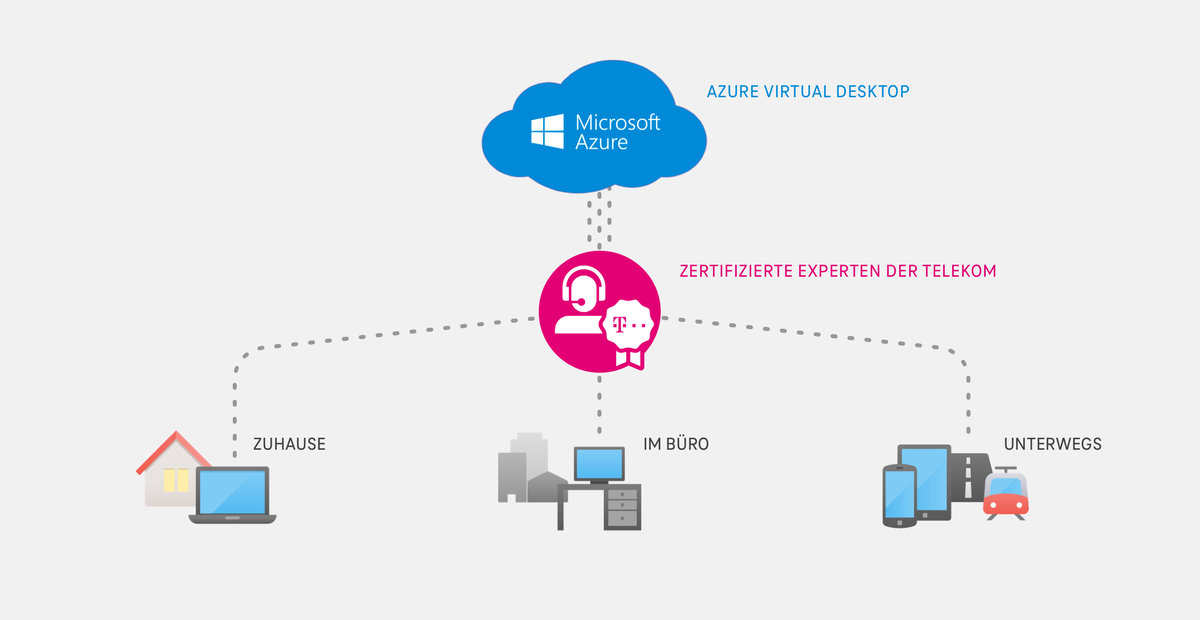
As businesses become increasingly complex, user needs are changing. They work...

Skip carousel content

... on specific tasks according to a flexible schedule,

... as independent contractors,

... in a remote location on your own devices.

Azure Virtual Desktop allows you to meet precisely these needs.

Skip carousel content

Wherever users are located...

And whatever device you use...

With Azure Virtual Desktop, you have access to the apps you need.

Overcome the challenges of the digital age with Azure Virtual Desktop

In order to respond flexibly to changing circumstances, companies today often need to provide fully equipped workstations within a very short time. With Azure Virtual Desktop, you can set up location-independent virtual computers for your employees via the Azure cloud platform at the touch of a button, combining all apps and desktops from different operating systems in a single, easy-to-understand interface. The optional ConnectWise backup solution and a selection of lightweight Microsoft Surface devices round off the overall package.

Your advantages with Azure Virtual Desktop

0
1
2
3
4

Work anywhere, just like in the office

Azure Virtual Desktop provides you with a fully functional virtual Windows work environment hosted on Microsoft Azure, where you can run your Microsoft 365 licences and the Office apps they contain, among other things. This gives your employees access to all the data and applications they need anytime, anywhere, allowing them to work from any location.

Highest standards for security and compliance

All data is processed and stored exclusively in the Microsoft Azure Cloud. The user's device serves only as an input device – the only requirement for this is an internet connection. In addition, numerous security and compliance features are already integrated into Azure. The ConnectWise Cloud Backup solution, which can be booked optionally from Telekom, provides reliable protection against data loss.

Existing investments retain their value

If you already have Microsoft licences, you can of course continue to use them with Azure Virtual Desktop – meaning your investments retain their value. Thanks to its scalability, Azure Virtual Desktop can be adapted to your current needs at any time. This allows you to reduce your overall infrastructure costs and remain flexible. Pay only for the services you actually use on a pay-as-you-go basis.

Provisioning your Azure Virtual Desktop (AVD)

We provide you with virtualised Windows desktops and apps in Azure according to your needs and help you get started in the virtual work environment. For optimal use of AVD, we recommend using Microsoft 365. Our cloud experts get your Microsoft 365 up and running quickly by migrating existing data and initially deploying integrated Microsoft 365 business features based on Telekom best practices.

The right solution for every need with Azure Virtual Desktop

Graphic: The right solution for every need with Azure Virtual Desktop

Personalised, quick and easy

Telekom offers customisable bundles that precisely meet your needs and allow you to quickly and easily provision fully functional, fully equipped workstations via the Azure Cloud. Information on the optional Microsoft Surface devices can be found here. The clear separation between end device and cloud even enables bring-your-own-device (BYOD) scenarios, in which your employees also have secure access to company data via their own private end devices in an emergency.

Basic requirements for Azure Virtual Desktop (AVD)

  One-off priceMonthly price
LicenceAzure-From €12.00 / user
 

Microsoft 365

If no existing licences are available

-From €16.05/user
FurnishingsSupport & configuration by 
a Telekom expert
From €1,100.00-

Get even more out of Azure Virtual Desktop with optional add-ons

  One-off priceMonthly price
DeviceMicrosoft Surface Go 3 LTE€844.42-
 Microsoft Surface Pro X LTE    €1,202.59-
 Microsoft Surface Pro 8 LTE€1,361.77-
Backup serviceConnectWise Cloud Backup-€4.95
Administrative serviceAdministrative support from a Telekom expert-€129.00

Professionelle Datensicherung mit ConnectWise Cloud Backup

Junge Frau sitzt vor ihrem Laptop und nutzt ConnectWise Cloud Backup für ihre Microsoft 365 Daten.

Professionelle Datensicherung mit ConnectWise Cloud Backup

Die Lösung zur Datensicherung ConnectWise Cloud Backup schützt Sie zuverlässig und DSGVO-konform vor Datenverlusten und ergänzt perfekt Ihren virtuellen Arbeitsplatz. Sichern Sie alle Daten der Microsoft 365-Anwendungen in deutschen Rechenzentren und stellen Sie sie im Notfall innerhalb von Sekunden mit nur einem Mausklick wieder her. Im Preis inbegriffen ist ein unbegrenztes Speichervolumen mit unbefristeter Aufbewahrung und ohne Datenüberschreibung. Erfahren Sie jetzt mehr über ConnectWise Cloud Backup.

Equip your employees with suitable end devices

Skip carousel content
Product image: Microsoft Surface Go 3 LTE

Microsoft Surface Go 3 LTE

Product image: Microsoft Surface Pro 8 LTE

Microsoft Surface Pro 8 LTE

Product image: Microsoft Surface Pro X LTE

Microsoft Surface Pro X LTE

The significant added value Azure Virtual Desktop offers your organisation

Older devices need to be replaced less often, and personal devices can be used for work without any problems if necessary. If you still need the right hardware, Telekom offers Microsoft Surface devices that are perfectly tailored for use with Azure Virtual Desktop. The ultra-light Microsoft Surface Go 3 LTE, for example, is suitable as an AVD client for employees who work in the field or are otherwise on the move a lot. The Microsoft Surface Pro 8 LTE or Microsoft Surface Pro X LTE, which are also perfectly tailored for use with the virtual desktop, provide more local computing power. Find out more about your options with Microsoft Surface devices at Telekom now.

Azure Virtual Desktop is particularly well suited for these use cases

Safety & Regulation

  • Data is stored centrally in the Microsoft Azure Cloud and not on local devices.
  • Use in areas with high security standards, such as the financial and healthcare sectors and in public authorities

Highly flexible scenarios

  • AVD allows staff to work flexibly, regardless of location – the desktop is always accessible
  • Remote working, short-term employment of new staff or contractors, access for partners, merger and acquisition scenarios

Bring Your Own Device (BYOD) and mobile users

  • For users who bring their own device or mobile users in the field
  • Call centres, branch office employees, use cases where user rights should be restricted

Software development

  • Software development and testing in a virtual environment instead of on local workstations
  • Hosting of highly specialised engineering and legacy applications in IT companies

How to reach us

0800 33 04444

Our team of certified Microsoft experts is here to help!
Monday to Friday from 8 a.m. to 8 p.m. and Saturday from 8 a.m. to 4 p.m. Fault reporting at any time.

Online support

Help & FAQs about Microsoft 365 and Office 365 subscriptions and editions.

Microsoft 365

About the premium services

With our premium services, we take care of your IT so that you have time for your business.

More about Microsoft Premium Services

Our expert service has received multiple awards and certifications.

  • Microsoft Gold Partner seal
  • Microsoft Modern Desktop Administrator seal
  • Microsoft Teams Administrator Seal
  • Microsoft Enterprise Administrator certification
  • Microsoft Security Operations Analyst
  • Seal Microsoft Azure Solutions Analyst